
Purchasing enterprise-grade hardware requires absolute supply chain transparency. Many IT managers and consumers face significant anxiety over whether a recently purchased system is factory-new, officially restored by the manufacturer, or secretly altered by an unauthorized third-party reseller. Because the physical appearance of a high-end refurbishment can be virtually indistinguishable from a new machine, relying on a visual check alone is insufficient.
Fortunately, identifying an official HP refurbished system or a certified notebook refurbished unit is a straightforward, highly objective process. HP embeds permanent tracking identifiers directly into its physical chassis labels and internal motherboard firmware. By decoding these deployment codes and cross-referencing them with official databases, you can instantly verify your computer’s true operational and restoration history.
Method 1: Decode the Product Label and SKU Suffix
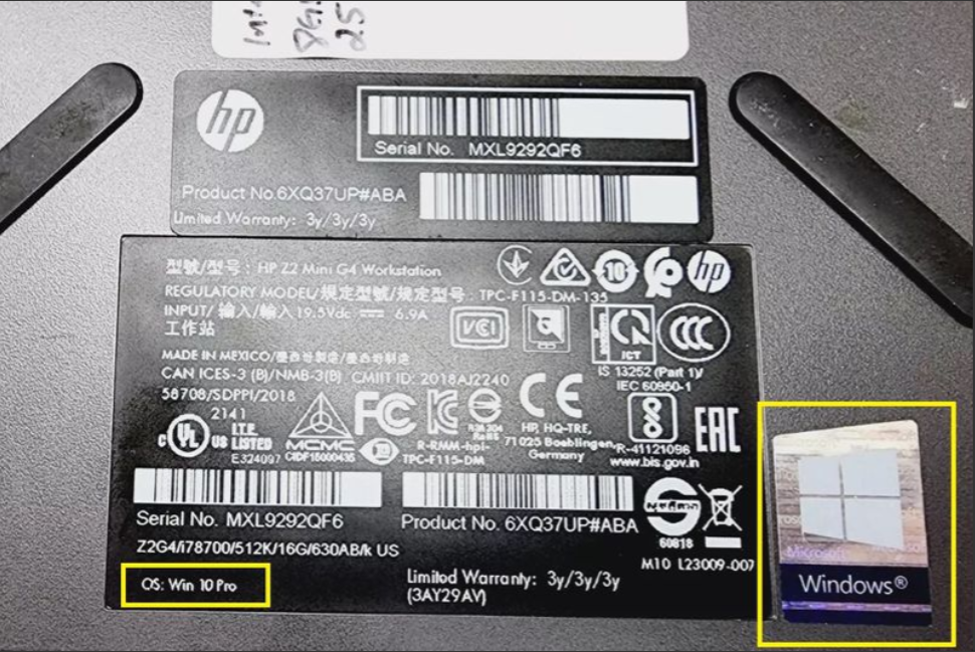
The fastest verification method relies on auditing the physical regulatory label. HP places this technical sticker on the bottom casing of laptops, inside the removable battery compartment, or laser-etches it directly onto the undercarriage of aluminum chassis models. For desktop form factors, it is typically affixed to the side or rear panel.
You must look specifically for the Product Number (SKU), which is entirely distinct from the Serial Number (S/N). HP utilizes a strict nomenclature formula across its global supply chain for factory-renewed inventory:
- The “R” Suffix Rule: Official factory-restored units feature a capital “R” character placed directly before the hash mark in the product number sequence. For example, a standard retail product number like A1B23U#ABA transforms into A1B23UR#ABA once it passes through HP’s official refurbishment pipeline.
- The “RFR” Designation: Certain commercial desktop lines and enterprise workstations substitute this rule with an explicit “RFR” string embedded within the SKU text block or printed on the regulatory barcode sticker.
- Physical Laser Markings and Text Indicators: Factory-certified boxes, shipping pallets, and original chassis labels often display the explicit word “Renew” or “HP Certified Refurbished” directly adjacent to the barcode matrix, indicating it was processed inside an authorized facility.
Method 2: BIOS Extraction and Warranty Cross-Referencing
Physical stickers can be peeled off, defaced, or intentionally swapped during unauthorized third-party hardware tampering to mask a machine’s true origin. To guarantee absolute accuracy, you must extract the hardware identifiers embedded in the system’s silicon and cross-reference them with HP’s master database.
[Power Off System] ➔ [Power On + Tap F10 Repeatedly] ➔ [Extract BIOS Firmware Strings]
The Step-by-Step Verification Workflow
- Boot System into the BIOS: Shut down the computer completely. Turn the system back on and immediately tap the F10 key repeatedly (roughly twice per second) before the operating system loading screen appears. This interrupts the boot cycle and forces the machine into the HP Computer Setup Utility.
- Audit the Core System Information: Locate the main configuration dashboard. Here, you will find the factory-flashed serial number and product SKU burned directly into the motherboard’s non-volatile memory (NVRAM) at the factory. This firmware-level data cannot be easily altered by standard users or unauthorized shops.
- Confirm the Chassis-to-Firmware Match: Verify that the internal BIOS serial number matches the physical chassis sticker exactly. If there is a mismatch, it indicates an unauthorized motherboard replacement or an illegitimately reassembled “Frankenstein” machine compiled from scrap parts.
- Query HP PartsSurfer and Warranty Verification Portals: Copy the confirmed serial number and input it directly into the official HP PartsSurfer or the online HP Customer Support Warranty Check portal. The manufacturer database will explicitly display the original factory build status, configuration history, original ship date, and whether the machine was flagged as a refurbished asset at its original point of distribution.
Authorized Refurbished vs. Standard Used Computers
Understanding your system’s underlying history highlights the massive divide between authorized refurbishment channels and unverified used computers bought on the open market.
Authorized refurbishment operates with total commercial transparency. HP and its certified partner vendors openly log a machine’s manufacturing origin, append permanent tracking SKU suffixes, and back the hardware with a binding corporate warranty.
Conversely, private peer-to-peer sellers operating on open marketplaces frequently conceal a machine’s true history, repair logs, and operational defects. Buying an unverified used device leaves organizations incredibly vulnerable to hidden liquid damage, expired consumer warranties, component degradation, or even buying stolen enterprise inventory locked by remote Mobile Device Management (MDM) profiles.
Conclusion: Refurbished Means Verified, Not Defective
Uncovering an official refurbishment identifier on your HP machine is a sign of operational security and quality control, not a manufacturing defect. A factory-restored badge proves that the computer has successfully passed through rigorous diagnostic stress tests, component replacements, physical hygiene overhauls, and firmware validation loops that standard pre-owned hardware never receives. It guarantees you are deploying a stable, certified asset built to perform reliably.Ready to deploy reliable, authenticated computing solutions across your workstation? [Browse our store’s inventory of certified HP refurbished systems today.] Every machine arrives with clearly disclosed product histories, pristine operational diagnostics, and a comprehensive corporate hardware warranty