
Can an Old Microsoft Surface Computer Laptop Be Upgraded?
Microsoft’s Surface lineup attracts immense consumer interest due to its premium, sleek hardware aesthetics. The vibrant PixelSense displays, responsive touchscreens, and minimalist unibody engineering rival any flagship device on the market. However, a Microsoft Surface laptop refurbished unit fundamentally alters how you must approach both physical hardware modifications and operating system upgrades. Its highly integrated design differs completely from a standard, modular computer laptop.
Understanding these strict architectural boundaries prevents costly procurement mistakes and ensures your device aligns with long-term operational requirements. If you are looking at cheap computers for sale to power your remote work or study setup, the Surface line offers incredible luxury—but only if you understand its static nature before checking out.
The Hardware Upgradability Reality: The Integration Barrier
Traditional business laptops allow users to easily expand internal components as software resource demands grow over time. Unlike those modular systems, the Microsoft Surface lineup features extreme physical hardware integration. Microsoft prioritizes ultra-thin structural profiles and lightweight portability over modular component accessibility.
This engineering approach introduces several critical physical constraints that completely eliminate the possibility of typical DIY hardware upgrades:
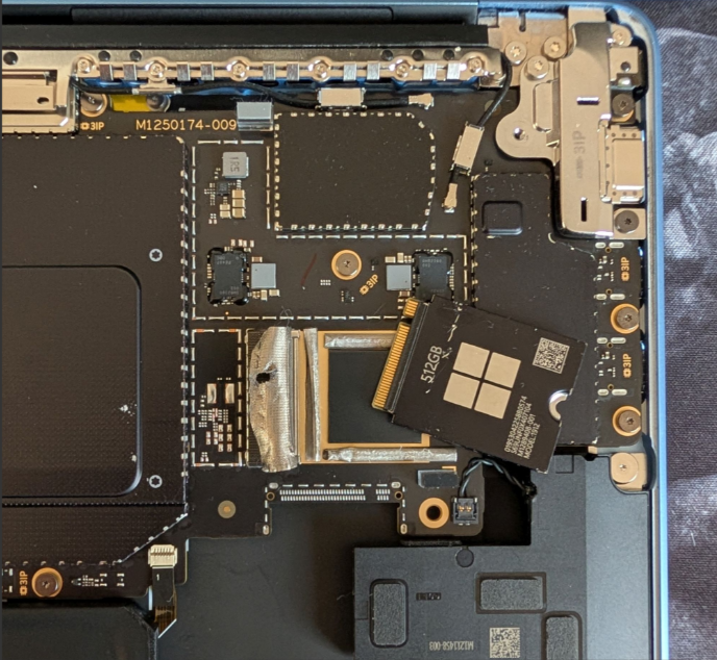
- Soldered Silicon: The volatile system memory (RAM blocks) is permanently soldered directly to the motherboard layout during factory assembly. If you buy a model with 8GB of RAM, it will have 8GB of RAM for its entire operational lifespan.
- Immobilized Storage: On legacy generations (such as the Surface Laptop 1 through 3), internal solid-state drives (SSDs) are frequently soldered down to the mainboard, preventing physical drive swaps or storage expansion.
- Adhesive Seals: The unibody chassis is sealed using high-strength industrial adhesives instead of standard structural screws. There are no easy-access doors or removable panels on the bottom of the casing.
- Destructive Disassembly: Accessing the interior requires peeling up the keyboard deck. On models featuring the signature Alcantara fabric, this process routinely tears the material, warps the thin aluminum under-structure, or destroys delicate ribbon cables underneath.
Physically upgrading an old laptop from the Surface line is virtually impossible for everyday users and remains highly risky even for certified hardware engineers. Consequently, you must purchase the exact memory and storage configuration you require for the device’s entire hardware lifecycle right from day one.
The Software and Windows 11 Upgrade Path
Operating system compatibility remains a primary concern for buyers evaluating pre-owned Surface hardware. Microsoft enforces strict silicon architectural boundaries for Windows 11 installation to guarantee hardware-level endpoint security. To officially support a native upgrade path, the internal processor must meet exact generational thresholds:
┌─────────────────────────────────────────────────────────────────┐
│ Surface Laptop Windows 11 Compatibility Check │
├──────────────────────┬──────────────────────────────────────────┤
│ Intel Architecture | 8th-Gen Core (Coffee Lake) or newer │
│ AMD Architecture | Ryzen 2000 Series (Zen+) or newer │
│ Security Hardware | TPM 2.0 (Active & Built-In) │
│ Upgrade Eligibility | Surface Laptop 3, 4, 5, 6, & Go / Studio │
└──────────────────────┴──────────────────────────────────────────┘
Legacy systems—such as the original Surface Laptop or Surface Laptop 2—house 7th-Generation or older Intel silicon. While these remain physically excellent machines with beautiful displays and comfortable keyboards, they are permanently locked out of official automated security updates.
Running an unsupported operating system introduces severe data compliance and security risks. Validating the exact central processing unit (CPU) generation prior to component acquisition is a non-negotiable step to avoid software obsolescence.
Smart Sourcing Strategy
Navigating the pre-owned computer ecosystem requires a disciplined procurement strategy to eliminate operational volatility. Purchasing a completely unverified old laptop from private, peer-to-peer digital marketplaces exposes buyers to unmitigated financial risks. Individual private sellers rarely disclose hidden battery degradation, internal display backlight bleeding, or non-compliant silicon generations that cannot run modern operating systems.
[ Peer-to-Peer Market ] ──► Risk of worn batteries, hidden defects, or dead-end CPUs
[ Certified Storefront ] ──► Vetted processors, battery health audits, & binding warranty
Sourcing a certified Microsoft Surface laptop refurbished system from an established, professional storefront removes this technical guesswork entirely. Technical specialists pre-audit the underlying processor generation against official Windows 11 compatibility matrices.
Furthermore, restoration experts execute multi-point diagnostic testing, optimize battery charging lifecycles, inspect the screen for touch responsiveness, and clean-install fully licensed operating systems. Most importantly, professional retail channels secure your capital investment by backing every highly integrated machine with a binding hardware warranty and clear return protection.
Conclusion: Balancing Integration with Performance
Physical internal components cannot be expanded or swapped inside Microsoft’s tightly integrated unibody architecture. However, choosing a pre-verified, Windows 11-compliant Surface model delivers premium flagship performance, exceptional screen clarity, and elite typing experiences at a massive discount compared to factory-new alternatives. True hardware value relies on sourcing compliant silicon configurations from certified professionals who guarantee the device is ready for modern production environments.
Test Certified Microsoft Surface Hardware
Do not risk your daily productivity on unverified hardware integration or older, non-upgradable processors. [Visit our physical retail storefront or explore our certified online showroom today to personally inspect, test, and deploy our fully compatible, certified Surface inventory.] Feel the premium premium premium touch response, verify the system properties live, and pick out the perfect configuration backed by our comprehensive hardware guarantee.