
Navigating big-box retail outlet tiers often introduces significant confusion for buyers targeting premium computing hardware. When searching for a deal, you will quickly encounter distinct labels like “Open-Box” and “Refurbished.” Deciphering the precise operational difference between these retail classifications is critical to maximizing your hardware budget while minimizing your risk.
The core distinction is straightforward: Open-Box units are essentially new customer returns that may only have packaging wear, while certified refurbished laptops are previously used, off-lease, or defective devices that have been professionally repaired, overhauled, and tested.
Understanding how return logistics, factory cosmetics, and diagnostic overhauls impact product grading ensures your investment remains secure.
Defining Open-Box Laptops
Open-box laptops originate almost exclusively from inventory returned within the standard retail return window—typically 15 days for standard buyers. These units are driven by buyer remorse, immediate preference shifts, or accidental purchases (such as choosing the wrong screen size or processor variant).
When a customer breaks the factory tape seal and returns the device, the retailer cannot legally resell the laptop as brand new, even if it was only powered on once. However, the internal component pipeline remains fundamentally untouched. The laptop has no prolonged operational history or component degradation.
[Customer Purchases New Laptop] ➔ [Opens Box] ➔ [Returns Within 15 Days] ➔ [Open-Box Tier]
Before entering the retail outlet stream, an open-box laptop undergoes basic physical and functional verification by store technicians. Personnel confirm the device boots properly to the native operating system, contains all essential inbox accessories (like the OEM power brick), and lacks major structural or cosmetic damage.
Best Buy Open-Box Grading Levels
Best Buy explicitly categorizes its open-box inventory into distinct tiers based on cosmetic condition and completeness:
- Excellent-Certified: Pristine, like-new condition with zero scratches. Professionally cleaned, containing all original parts, manuals, and packaging.
- Excellent: Looks and works like new, but might arrive in a generic brown box because the original cardboard packaging was damaged or discarded.
- Good: The system functions perfectly, but minor cosmetic blemishes—such as light surface scratches or faint dents—are present. It may be missing non-essential accessories like zip ties or documentation.
- Fair: Severe financial markdowns apply here. The machine operates normally but shows significant cosmetic wear, deep scratches, or minor scuffs, and is often missing non-essential parts.
Because these machines have essentially zero operational mileage, they generally retain the balance of their original one-year manufacturer warranty. Price reductions are modest—typically 10% to 30% off the original retail price—reflecting only the compromised state of the cardboard packaging.
Defining Best Buy Refurbished Laptops
In contrast, refurbished laptop computers follow an entirely separate, highly intensive technical pipeline. These systems were previously deployed in the field for months or years. They enter the refurbishment loop after being returned due to verified hardware component failures, or sourced directly from corporate off-lease trade-in agreements where enterprises refresh their hardware fleets. They are not simple open-box returns; they are field-tested machines requiring technical intervention.
The refurbishment process requires routing the hardware back to the original manufacturer (OEM) or an authorized, certified third-party repair center. Technicians execute a comprehensive diagnostic overhaul rather than a simple visual inspection. This includes:
- Automated Circuit Testing: Stress-testing the motherboard, chipsets, and RAM registers to identify intermittent hardware faults.
- Component Replacement: Swapping out degraded internal lithium-ion batteries that fail to hold a charge, or replacing mechanical hard drives with fast, brand-new solid-state drives (SSDs).
- Deep Thermal Sanitation: Stripping down the chassis to blast dust out of cooling fans and heat sinks, followed by applying fresh thermal paste to the CPU.
- Cryptographic Erasure: Performing military-grade data sanitization on all storage media to ensure data privacy, followed by a clean, authorized operating system installation.
Cosmetic grading standards allow for minor, non-functional surface blemishes, but the internal hardware architecture is brought entirely up to original factory specifications.
The Core Hardware Comparison
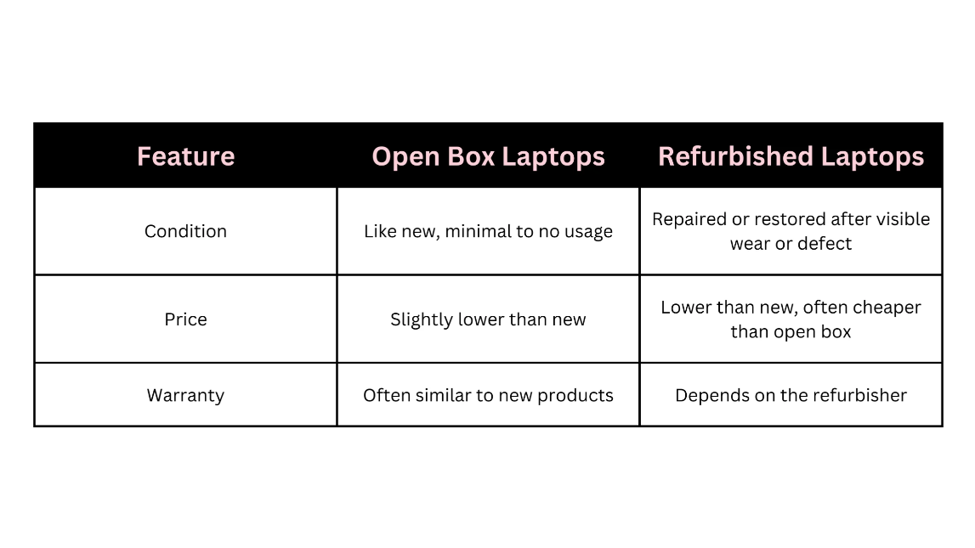
When auditing potential PC purchases, strategic buyers must weigh specific technical and financial variables across both categories:
| Variable | Open-Box Laptops | Refurbished Laptops |
| Device Origin | Short-term consumer returns (buyer remorse). | Defective inventory, floor models, or corporate off-lease contracts. |
| Technical Intervention | Fundamental triage, basic boot testing, and surface cleaning. | Deep component replacement, board-level validation, and stress testing. |
| Warranty Coverage | Carries the remaining balance of the original 1-year manufacturer warranty. | Typically backed by a limited 90-day to 1-year outlet or third-party warranty. |
| Financial Markdown | Low-to-moderate discounts (10% to 30%) on current-generation hardware. | Massive value retention, slicing up to 50% or more off original MSRP. |
The Enterprise Architecture Advantage
Consider a business-class refurbished Lenovo ThinkPad, Dell Latitude, or HP EliteBook. Buying these machines through the refurbishment pipeline allows a consumer to secure a rugged, enterprise-grade magnesium alloy chassis, military-spec drop protection, and professional Intel vPro processor architecture at the exact price point of a cheap, consumer-grade plastic laptop bought brand new.
Because corporate laptops are built to last 5 to 7 years in high-stress environments, the comprehensive factory vetting completely mitigates the risks of buying used enterprise gear.
⚠️ Warranty Note: Always check the fine print on refurbished product listings. While Best Buy Open-Box items allow you to add standard Geek Squad Protection plans easily, refurbished units sourced through third-party marketplace sellers on Best Buy’s platform may feature separate, non-transferable third-party warranties.
Conclusion & Strategic Summary
Maximizing your hardware procurement requires matching your specific risk tolerance and budget to the appropriate retail tier.
Open-box inventory offers a lower discount on near-new gear, delivering pristine factory cosmetics, original manufacturer protection, and access to current-generation silicon architectures. Conversely, refurbished hardware delivers maximum value on thoroughly vetted machines, trading minor cosmetic wear for steep price reductions on high-tier, commercial-grade components.
Browse our store’s curated inventory of rigorously certified, high-performance computing solutions to find the perfect balance of performance, warranty coverage, and value for your daily workflow.